Product guide
Review attention hints with Mail
Mail explores a calmer way to review conversations, reply requests, bills and receipts. It offers hints for the user to check, rather than guaranteeing that every important message is found.
Hosted fictional preview. Real inbox remains disconnected.
Spot an example reply request
Understand what a Mail attention hint means.
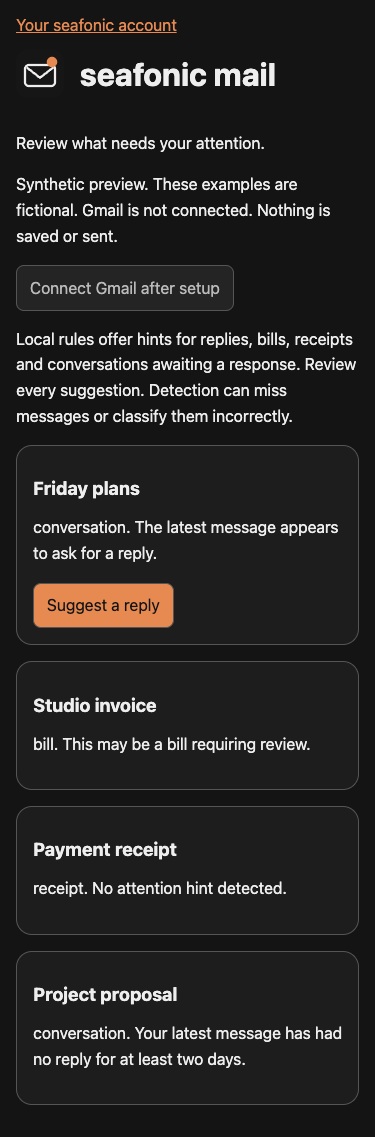
The preview contains fictional messages. Gmail is disconnected.
- Read the synthetic preview notice before reviewing a conversation.
The page confirms that nothing is saved or sent.
- Find Friday plans and read its reply hint.
The example says the latest message appears to ask for a reply.
- Treat Suggest a reply as a suggestion to review.
It is not an email sent on your behalf.
You understand a reply hint and its limits without opening a real inbox.
If something goes wrong
Connect Gmail is disabled. The integration is not ready. No new login is required to read this preview.
A hint seems wrong. Review the original message when a private inbox is eventually enabled. Hints are not definitive decisions.
Security and privacy
The public fictional preview is free and has no connected inbox. Real Mail use is intended to require a paid app entitlement or separately verified super administrator access. Those new gates remain local preparation.
Neither payment nor administrator app access replaces exact mailbox ownership, account custody and provider consent. General signup cannot open another person’s inbox. Real Gmail remains unavailable, and the prepared custody and sign out protections are not an activated connected service.
Attention hints can miss or misclassify messages. Review the original message and any suggested reply yourself. Keep private email, invoices and account details out of Community examples.
Read the security guideMore product information and background
Available pages
- Fictional Mail preview
Public synthetic examples. Not a connected inbox.
How to use it
Read the availability label first. Actual app use requires approved access when released. Local demonstrations use fictional records.
- Open the preview and read its fictional data notice.
- Review the example conversations and their attention hints.
- Compare a reply request, bill, receipt and conversation awaiting a response.
- Treat a reply suggestion as something to review. It is not an email sent on your behalf.
- Keep real messages and inbox priorities out of public Community posts.
What to expect
An explanation of Mail’s intended attention workflow without connecting, reading or sending real email.
The public preview sends nothing and stores no real mailbox content.
Things to know
- Gmail is not connected. Nothing in the public preview is saved or sent.
- A future connected inbox is restricted to its pinned verified owner and separately verified mailbox identity.
- App signup and general app grants do not override private inbox ownership.
- Detection can miss messages or classify them incorrectly. Real scheduling, account custody and sending remain separate review boundaries.
- The fictional preview stays public and free. Actual Mail connection and use are intended to require a paid entitlement, with separately verified super administrator access. These gates are still local preparation. They do not override exact mailbox ownership. Real Gmail remains unavailable.
Getting help
Connect Gmail is disabled.
The integration is not ready. No new login is required to read this preview.
A hint seems wrong.
Review the original message when a private inbox is eventually enabled. Hints are not definitive decisions.
Public guide version 2026-10-03.6.1. Reviewed 2026-10-03.