Product guide
Understand sound controls with audio
audio explores headset control and microphone processing. Its device control screen and browser input lab have different jobs. A local demonstration does not establish support for every headset or sound application.
Local prototype. Supported noise controls have device readback evidence. Native Mac routing is unfinished.
Check headset control readiness
Recognize missing device state before trying a control.
An owner supplied local review and the supported GameHub are required. Hardware support is limited.
- Read the connection status before using controls.
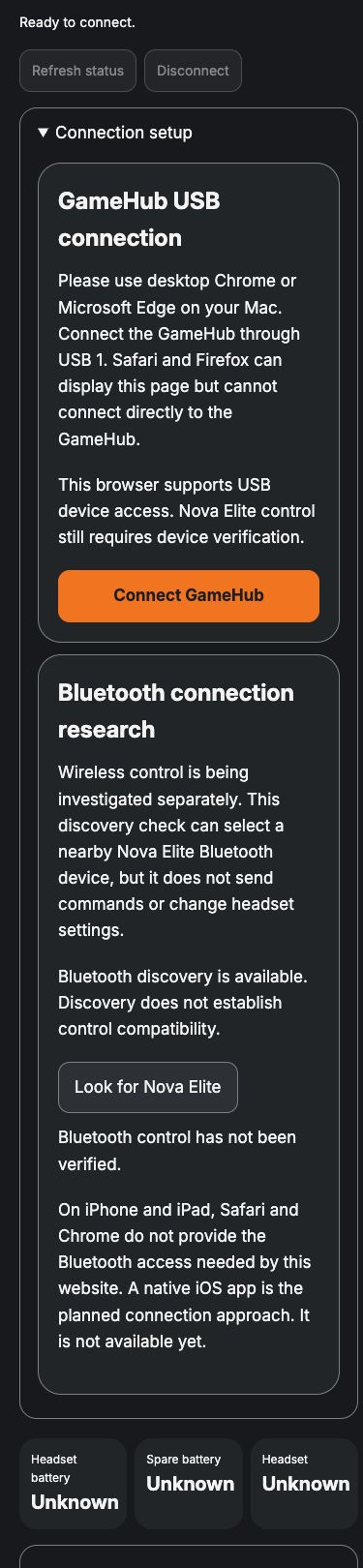
The disconnected capture says Ready to connect, not Connected.
- Review the connection setup and supported browser information.
You can see that a compatible desktop browser and device permission are separate requirements.
- Treat Unknown device values as unavailable information.
Do not apply an assumed volume, EQ or sidetone value. Selecting a preview does not confirm a hardware change.
You can tell whether the interface has enough device information to proceed.
If something goes wrong
The device value is Unknown. Do not apply an assumed value. Device readback and protocol verification are still required.
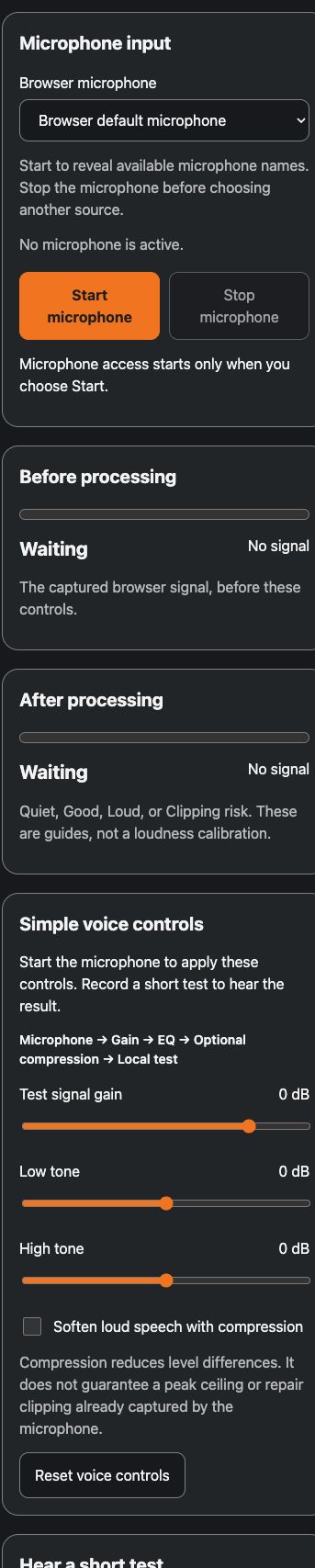
Changing controls does not change an existing test. Record a new test after changing controls. Existing clips are unchanged.
Another app still receives the original microphone. System audio routing is not implemented by the browser lab.
Security and privacy
Choose microphone capture, playback and device connection yourself. Browser permission does not establish account ownership or trusted pairing. Several headset controls remain unverified, so a selected setting must not be treated as a confirmed hardware change.
The separate input lab is described as keeping deliberate short tests temporarily in browser memory without upload or account saving. It processes only its own capture. Stop releases capture, and hiding or leaving releases capture and clears tests. This limited prototype behavior does not establish system microphone routing or a general cloud data policy.
Read the security guideMore product information and background
Available pages
- Headset controls
Local development page. No hosted release.
- Input lab
Local browser prototype. Real microphone symptom remains unresolved.
How to use it
Read the availability label first. Actual app use requires approved access when released. Local demonstrations use fictional records.
- In an owner supplied review, inspect the connection and status labels before changing anything.
- The headset screen can display unknown values. Do not assume a selected sound card has changed the device.
- For the separate input lab, choose Start microphone only when you want capture and approve the browser prompt yourself.
- Set the voice controls before making a short test. Choose playback yourself. Later control changes require a new recording.
- Stop capture and delete the temporary test when finished.
What to expect
The interface shows what is known, what is a preview and what is still unavailable. No microphone, playback or device operation was performed to create these screenshots.
One deliberate test of up to 15 seconds can stay temporarily in browser memory. No audio is uploaded or saved to an account. Stop releases capture. Hiding or leaving releases capture and deletes tests.
Things to know
- The prototype targets the SteelSeries Arctis Nova Elite GameHub using a compatible desktop Chrome or Edge browser and explicit device permission. Other headsets and Bluetooth control are unverified.
- The product owner records matching GameHub readbacks for noise mode, ANC strength and transparency changes. These are device status observations, not calibrated acoustic measurements.
- Initial volume without knob movement, browser volume writes, physical EQ and sidetone effects remain unverified. Current gain readback is unavailable. Unknown values must stay unknown.
- The browser input lab processes only its own microphone capture. It does not change headset hardware gain, an existing recorded clip or another app’s microphone.
- There is no live monitoring or native Mac audio routing. Source level bars do not prove processing by the headset.
- The reported real microphone problem remains unresolved. There is no hosted Audio release, verified remote source backup, account library or trusted device pairing.
Getting help
The device value is Unknown.
Do not apply an assumed value. Device readback and protocol verification are still required.
Changing controls does not change an existing test.
Record a new test after changing controls. Existing clips are unchanged.
Another app still receives the original microphone.
System audio routing is not implemented by the browser lab.
Public guide version 2026-10-03.6.1. Reviewed 2026-10-03.