Preview library. Using a library palette in darkmode and sharing are not connected yet.
Preview a palette
Try a palette on the whole page without replacing your saved appearance.
Open Community in your browser. You do not need an account to browse these seafonic examples. Interactive previews need JavaScript.
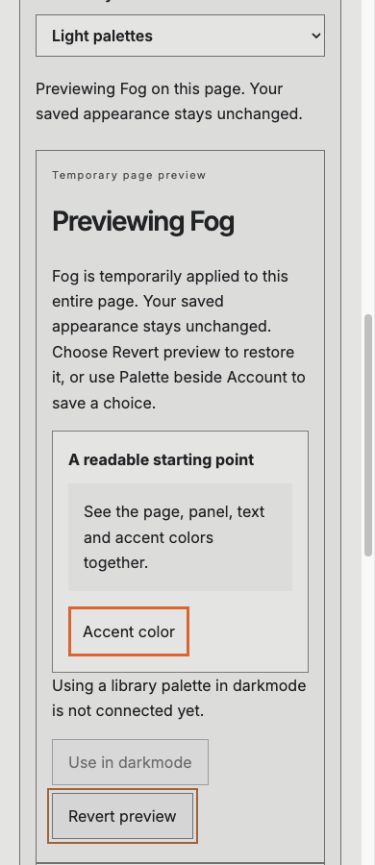
The reviewed Fog page preview on a phone, captured locally on October 10, 2026. Revert preview returns to your saved appearance. Applying the palette in darkmode is not connected yet.
Open Community and browse the palette cards.
Six palettes are labeled with their names, light or dark style, and Published by seafonic.
Choose a Palette style, then choose Preview beside a palette.
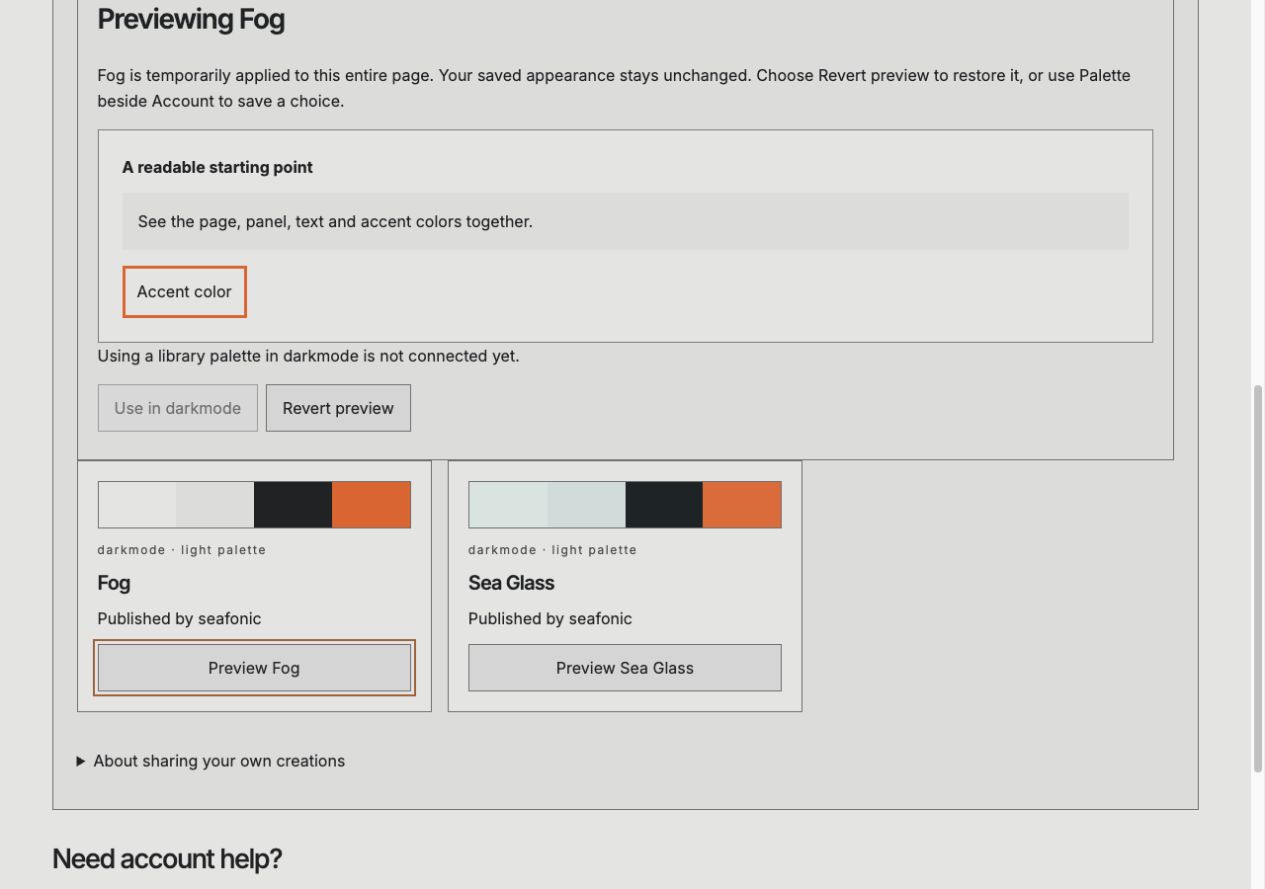
The whole Community page uses those colors. Temporary page preview appears above the cards, with a Revert preview button. Your saved appearance stays unchanged.
Choose Revert preview to return to your saved appearance.
The temporary colors end, your saved appearance returns and focus returns to that palette’s Preview button. No palette is added to darkmode.
The preview colors the whole Community page temporarily. Revert preview returns to your saved appearance.
If something goes wrong
Use in darkmode is unavailable. Applying a library palette to darkmode is not connected yet. Signing in does not enable it.
I cannot share my own palette. Sharing is not connected yet. This page sends no submission.
The palette names appear, but Preview does not work. Interactive previews need JavaScript. You can still read the palette names and color samples. Palette beside Account changes the whole website page and saves your choice.
I cannot find Revert preview. Revert preview appears while a preview is active. Choosing a saved palette from the header ends the preview. Choose Preview beside a library palette to start another temporary preview.
Browse and preview seafonic palettes
Before you start. Open Community in your browser. You do not need an account to browse these seafonic examples. Interactive previews need JavaScript.
Open Community and browse the palette cards.
What you should see. Six palettes are labeled with their names, light or dark style, and Published by seafonic.
Choose a Palette style, then choose Preview beside a palette.
What you should see. The whole Community page uses those colors. Temporary page preview appears above the cards, with a Revert preview button. Your saved appearance stays unchanged.
Choose Revert preview to return to your saved appearance.
What you should see. The temporary colors end, your saved appearance returns and focus returns to that palette’s Preview button. No palette is added to darkmode.
Expected result. You compare colors on the whole page, then revert without installing or sharing anything.
If something goes wrong
Use in darkmode is unavailable. Applying a library palette to darkmode is not connected yet. Signing in does not enable it.
I cannot share my own palette. Sharing is not connected yet. This page sends no submission.
The palette names appear, but Preview does not work. Interactive previews need JavaScript. You can still read the palette names and color samples. Palette beside Account changes the whole website page and saves your choice.
I cannot find Revert preview. Revert preview appears while a preview is active. Choosing a saved palette from the header ends the preview. Choose Preview beside a library palette to start another temporary preview.
Save the website appearance
Before you start. Use Palette beside Account in the website header.
Open Palette beside Account and choose a palette.
What you should see. The whole page uses the selected palette and remembers it as your browser preference. Any temporary library preview ends.
Expected result. The website keeps your selected appearance. No palette is installed in darkmode.
Retained information
The library contains seafonic palette examples. A preview changes this page temporarily without replacing your saved appearance. Only choosing Palette in the header saves a new website choice. The library sends no submission.
Reviewed 2026-10-10.
Your browser
Information
Appearance choice
Legacy appearance visibility preference
Purpose
Remember your saved website palette. A temporary library preview does not replace it. An earlier visibility preference may remain in browser storage, but Palette stays available in the website header.
Who can access it
The site and your browser profile.
Retention
Appearance remains until changed or site storage is cleared.
Current state
Public website and help.
Community library
Information
Six seafonic palette names, styles and colors
Purpose
Help you compare seafonic starting palettes.
Who can access it
Anyone reading the public library.
Retention
Examples are part of the published page. No personal contribution is stored by the library.
Current state
Public examples published by seafonic.
The page address and your browser history
Information
Selected app filter
Selected palette style
Selected temporary page preview
Purpose
Preserve the selected filters and temporary preview when you reload or use Back and Forward. Revert preview removes the current preview from the page address.
Who can access it
Your browser profile and anyone you choose to share the page address with.
Retention
The choices remain in the page address and may remain in browser history until you clear it.
Current state
Public palette choices. A preview is separate from saved website appearance; no account identity or private creation is included.
Website delivery
Information
Connection information used to deliver the page
Purpose
Load and operate the website.
Who can access it
The hosting service and authorized operators.
Retention
The full operational log and backup retention period is not yet documented.
Current state
Public website delivery.
What still needs verification
Using a library palette in darkmode and sharing are not connected. Reading this guide does not connect an app or grant account access.
Security and privacy
The library contains seafonic palette examples. This page does not accept submissions or request access to your account. Any future sharing would require your explicit choice.
Filters and the selected preview appear in the page address. They contain palette choices, not private creations or account information.
Open Community in your browser. You do not need an account to browse these seafonic examples. Interactive previews need JavaScript.
Open Community and browse the palette cards.
Choose a Palette style, then choose Preview beside a palette.
Choose Revert preview to return to your saved appearance.
What to expect
You can compare colors on the whole page and return to your saved appearance.
A temporary page palette preview. Use Palette beside Account if you want to save a website appearance.
Things to know
These six palettes are published by seafonic. They are not submissions from other people.
Preview temporarily changes the whole Community page. It does not save a website appearance or install a palette in darkmode. Revert preview restores your latest saved choice.
Use in darkmode and sharing are not connected yet. Signing in does not enable them.
Interactive filtering and previews need JavaScript. Palette names, labels and color samples remain readable without it.
Choosing a palette using Palette beside Account saves that website choice and ends the temporary preview. It does not apply a palette in darkmode.
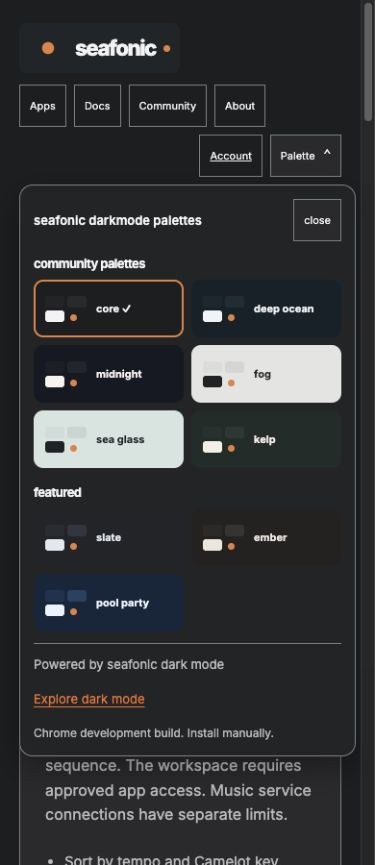
The reviewed desktop preview detail, captured locally on October 10, 2026. Fog temporarily colors the Community page. Revert preview is above the palette cards.The reviewed Fog page preview on a phone, captured locally on October 10, 2026. Revert preview returns to your saved appearance. Applying the palette in darkmode is not connected yet.Open Palette beside Account. Community and Featured choices use seafonic dark mode. Explore dark mode opens its information page.
Getting help
Use in darkmode is unavailable.
Applying a library palette to darkmode is not connected yet. Signing in does not enable it.
I cannot share my own palette.
Sharing is not connected yet. This page sends no submission.
The palette names appear, but Preview does not work.
Interactive previews need JavaScript. You can still read the palette names and color samples. Palette beside Account changes the whole website page and saves your choice.
I cannot find Revert preview.
Revert preview appears while a preview is active. Choosing a saved palette from the header ends the preview. Choose Preview beside a library palette to start another temporary preview.