Local development preview. Real connections are unavailable.
Read the sample workspace
Recognize the sample agents and understand that they are examples.
Use the separate local preview supplied by the team.
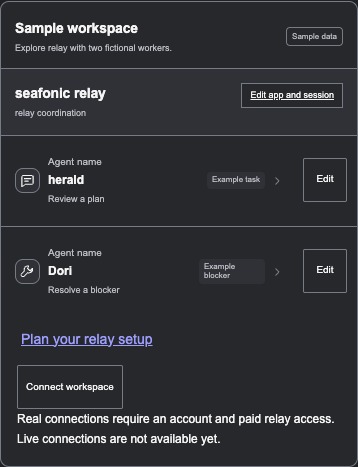
Development preview, captured October 10, 2026. These agents and tasks are fictional. No actual session is connected.
Open Overview.
Sample workspace contains fictional agents and example tasks.
Expand a sample agent to read its example.
The example appears. Reading it does not send an instruction or connect a session.
Choose Palette if you want to change the colors.
The shared selector opens. Your chosen color is saved in this browser; Close or Escape returns to Palette.
You can explore the preview without confusing sample activity with real work.
If something goes wrong
I expected my actual tasks. This view is a sample workspace. A supported real session connection is not available.
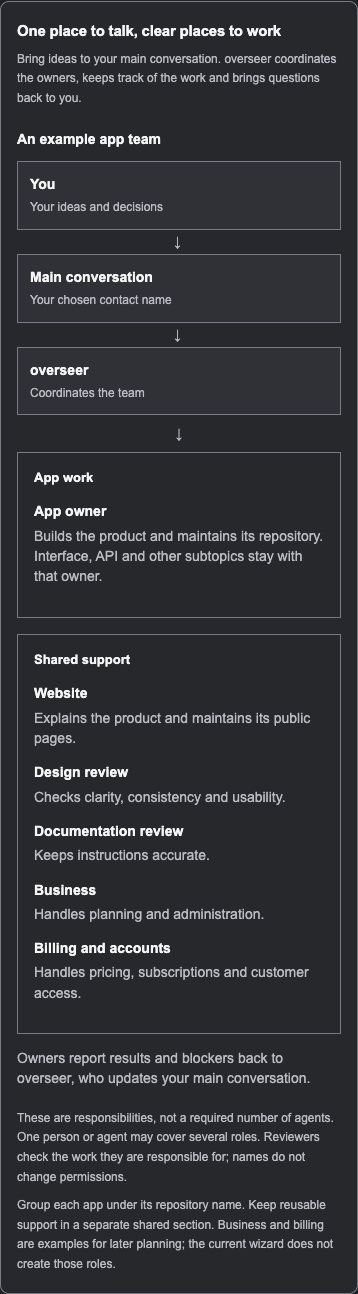
Understand the proposed team
Before you start. Use the supplied local preview. Help explains a proposed way of working, not a connected service.
Choose Help, or follow See how an app team works at the start of setup.
What you should see. The team explanation opens. The link in setup opens a new tab so your unsaved draft stays open.
Read the team chart and the example responsibilities.
What you should see. Your main conversation is separate from overseer, who coordinates the team. Each app has an accountable owner. Design, documentation and website support are example responsibilities, not a required number of agents.
Read how an idea becomes a checked result, then return to your plan when ready.
What you should see. You can distinguish an assigned task, work that actually started, a reported result, a checked result and publication. Reading Help does not create or connect a team.
Expected result. You understand the proposed roles and review process before describing your own plan.
If something goes wrong
I expected the chart to connect my actual workers. The chart is an explanation only. Real session connections are unavailable in this preview.
Change a sample agent name or icon
Before you start. Use the fictional sample workspace.
Choose Edit beside a sample agent.
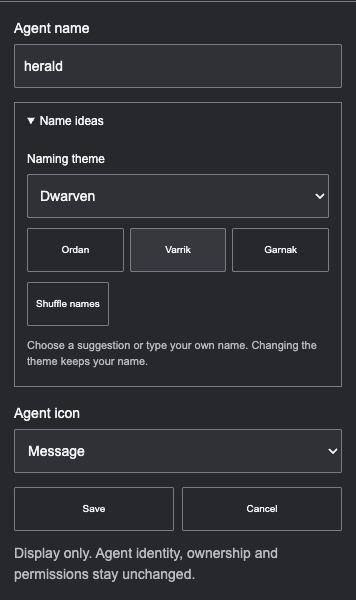
What you should see. The local name and icon editor opens.
Enter a name and choose an icon, then choose Save.
What you should see. The local display changes. A blank name is refused.
Choose Cancel or press Escape if you want to leave the previous choice.
What you should see. The edit is discarded. No actual session, identity, responsibility or permission changes.
Expected result. The sample is easier to recognize in this browser.
If something goes wrong
I cannot find app and session labels. Those separate display labels are in Settings.
Save a plan without connecting
Before you start. Plan only. Real account connections and payments are unavailable.
Open Connections and choose Plan setup.
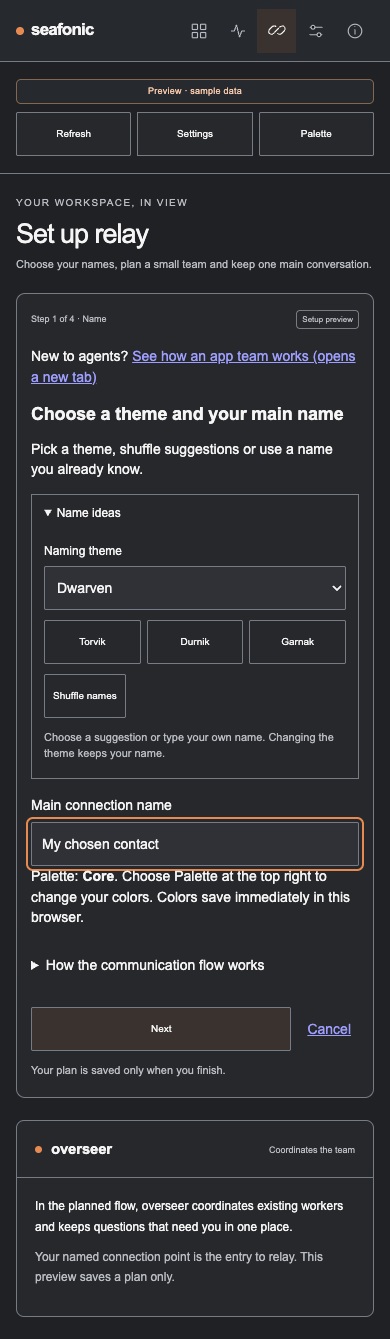
What you should see. The four steps are Name, Work, Follow up and Review. This is a plan; it does not connect a real session.
In Name, choose a naming theme and edit your main contact name. Use Palette at the top if you want different colors.
What you should see. Suggestions are optional and names stay editable. Palette colors save immediately in this browser, separately from the plan.
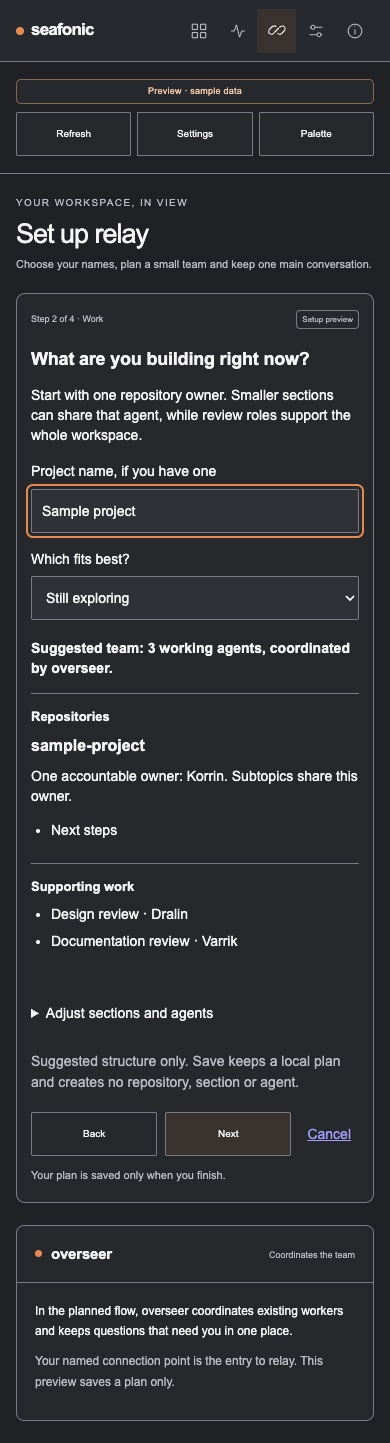
In Work, add a project name if you have one and choose what fits best. Read the proposed team. Open Adjust sections and agents if you want to edit it.
What you should see. The plan suggests one repository owner with smaller subtopics and supporting review roles. It creates no repository, section or agent.
Choose the Follow up preferences you want to describe. Review the plan and choose Save setup plan. Use Cancel to leave the saved plan unchanged.
What you should see. The browser saves the local plan if storage is available, or reports that it could not save. No real connection, schedule, skill, grant or payment is activated. Cancel does not undo a Palette choice already saved.
Expected result. You have a local plan with editable names and proposed work sections. It clearly remains unconnected.
If something goes wrong
The plan did not connect a worker. Saving is planning only. Real participant connections are not available.
Find an optional name idea
Before you start. Use a sample agent editor or the Name step of the local setup plan.
Open Name ideas. Dwarven is the default. Use Naming theme to choose Star explorers or Crew roles if you prefer.
What you should see. The preview shows suggested names. Changing the theme keeps the name you already typed.
Choose Shuffle names for another set. Select a suggested name if you want it in your draft, or keep typing your own.
What you should see. Only choosing a suggestion puts it into the name field. You can still edit it.
Choose Save in the agent editor, or finish the setup plan when you want to keep the draft. Use Cancel to discard an agent edit.
What you should see. This saves a local display name or plan. No real agent, session, identity or permission is renamed. Palette changes save separately as soon as you choose them.
Expected result. You have a name you deliberately chose, while manual editing remains available.
If something goes wrong
Changing the theme did not change my typed name. That is deliberate. Select a suggestion only when you want to replace the draft name.
Retained information
The local preview uses fictional examples. Display preferences and an optional setup plan stay in this browser.
Reviewed 2026-10-10.
This browser profile
Information
Display names and icons
Palette choice
Saved setup plan
Purpose
Keep local presentation preferences and a plan you deliberately save.
Who can access it
The local preview and this browser profile.
Retention
Until changed or the preview site data is cleared. Other profiles and origins do not automatically share these preferences.
Current state
Local development preview only.
What still needs verification
Storage, retention and removal rules for a real connected service remain unverified.
Privacy and connections
Keep account secrets and private transcripts out of labels, setup plans and public screenshots.
The setup plan is not a permission grant or account connection.
The preview describes a future history of decisions, handoffs and checked results. The storage limits, how long records would be kept, and cleanup controls have not been decided or enabled.
Your chosen main contact and overseer have different roles. Choosing a name in this preview does not change actual contact routing or coordinator authority.
Public information. The local preview is supplied separately.
How to use it
Use the local preview only if supplied by the team. All sample agents and activity are fictional.
Open Overview and expand a sample agent.
Use Palette to choose colors for this browser.
Use Connections and Plan setup to describe a plan without activating a connection.
What to expect
You understand the preview and its current limits.
Local display preferences and an optional browser setup plan.
Things to know
Real session connections, account sign in, payments and continuous activity are unavailable.
A reported outcome is separate from execution and verified completion.
Saving a plan does not activate a schedule, skill, account grant, payment or connection.
No paid plan, custom report, price or delivery date is offered.
Do not include passwords, tokens, sign in links or private transcripts in display names or a plan.
The setup preview explains an intended communication flow. It does not create topics, assign agents or connect devices.
Suggested repositories, subtopics and supporting roles remain a plan. Saving creates no repository, section or agent.
Development preview, captured October 10, 2026. These agents and tasks are fictional. No actual session is connected.Development preview, captured October 10, 2026. These optional suggestions change only a draft until you choose to save. No real agent or session is renamed.Local development preview, captured October 10, 2026. Read Help before planning. The contact name is fictional and unsaved. No session is connected.Local development preview, captured October 10, 2026. Sample project and the suggested team are fictional. Nothing was saved, created or assigned.Local development preview, captured October 10, 2026. The chart explains proposed responsibilities. It does not connect workers or create a required number of agents.
Getting help
Connect workspace is disabled.
Real connections are not available in this preview. Signing in elsewhere does not activate them.
A display name or plan does not save.
Fill in the required name. Read the visible storage message. The browser may not be able to save local preferences.